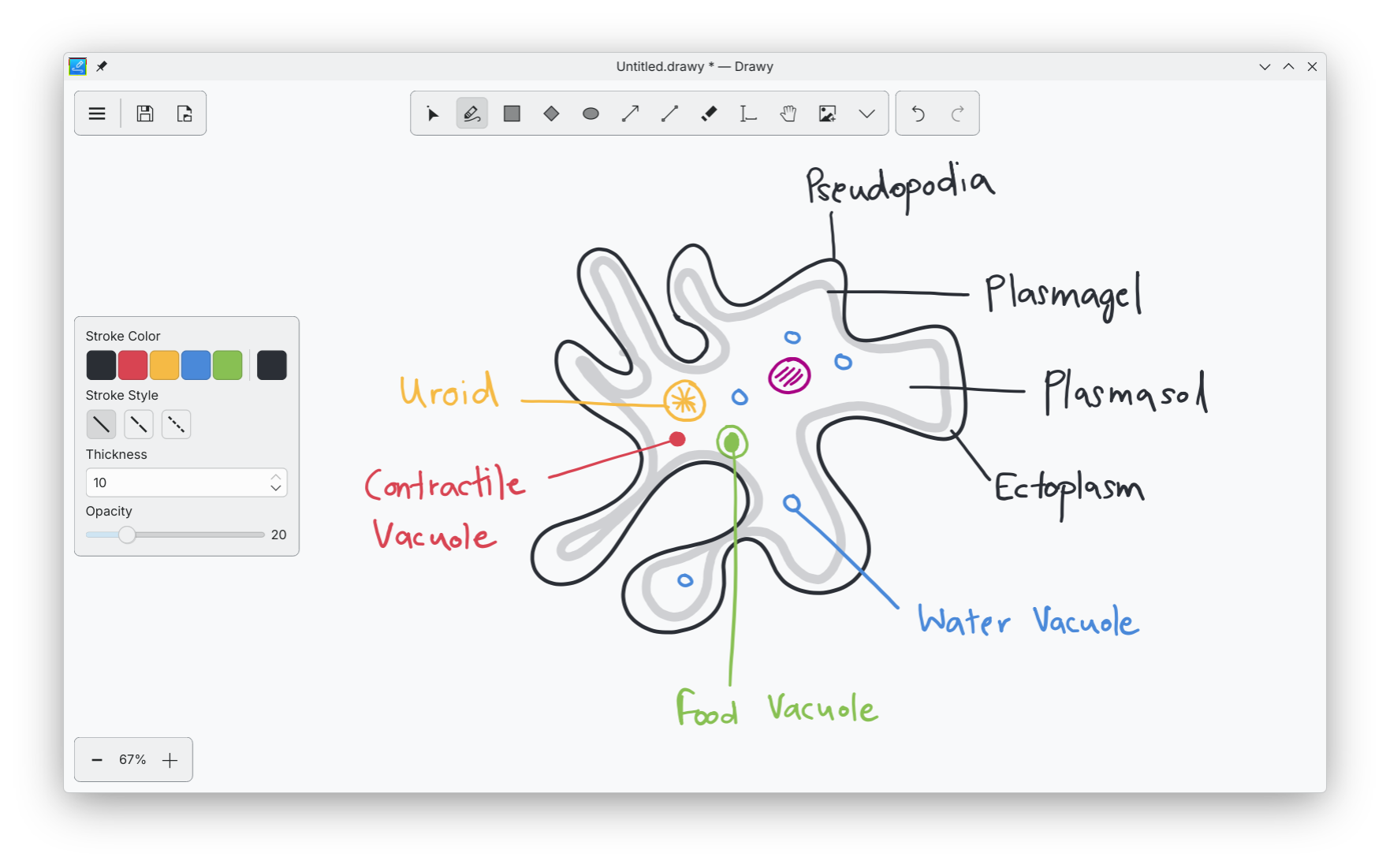
This is Drawy, KDE’s first infinite whiteboard app written entirely in C++ and Qt. It is inspired by the popular web-based Excalidraw. Its main focus is simplicity, ease of use, and performance. You get all the usual essential features, such as drawing tablet and touchscreen support, basic shapes like rectangles, ellipses, arrows with different arrowheads, lines, etc., text and image support, as well as many other features such as groups, reordering elements, alignment, etc.
Why?
There’s a short story behind this. A few years back, I got myself an XP-Pen Deco Mini 7, which is a drawing tablet for brainstorming and studying digitally. I’ve been a Linux user for many years, so it was natural that I looked for writing apps made for Linux. I stumbled upon Xournal++, which is an awesome FOSS note-taking app. I should mention that I wanted something for brainstorming and not for note-taking. I used it for a good number of days until I realized that I wanted an infinite canvas, as I hated navigating back and forth between pages whenever I ran out of space. I then discovered Lorien, which is a FOSS whiteboard app that features an infinite canvas. While it did the job, it lacked basic features such as resizing items, and its stroke smoothing felt average. I later tried RNote. It felt like the best app out there and worked flawlessly. The main issue that I found was that its interface required more clicks than necessary to perform certain actions. For example, if you wanted to create an ellipse, you’d need to click on the shapes button -> shape menu -> ellipse. That’s three clicks. This may sound like a small issue, but when you want to brainstorm quickly, it gets annoying. It also doesn’t allow you to customize the keybindings. I then stumbled upon Excalidraw. It was a dream come true. It was simple, fast, infinite, and had plenty of features. However, it being a web-based app was its biggest downside for me. First, it lags a lot on Firefox. If you are a Firefox user, you will notice that Excalidraw does not offer the same performance as it does on Chromium-based browsers. For some weird reason, this problem is even worse in dark mode. Second, with web-based apps, you lose the ability to save files on your desktop and open them by double-clicking. I’m also a computer science student in my pre-final year, so I was naturally looking for project ideas to work on to strengthen my skills. So I decided that I would make a whiteboard app in C++ because I enjoy working with C++. Qt felt like the natural choice, given that I wanted to work with C++.
Development
I began developing Drawy in January 2025. I had just learned the basics of Qt and went all in. The first prototype had a finite canvas with basic tools like a pen, some shapes, and an eraser. The code was a mess, but it worked. Later, I learned about low-level design and SOLID principles, so I studied more and refactored the entire codebase around those concepts. This made the code much more maintainable and open to expansion. Development was quite slow, as I only worked on weekends due to college. Many weekends went by without any progress for various reasons, but I never abandoned the project. A fun fact: I’m in a coding club at my college called “Hash Define,” where it is a practice for us to teach junior students in the same club. It goes like this: you’ll be taught by your seniors, then when you become a senior, you teach your juniors. So I used to teach them concepts related to algorithms, data structures, and object-oriented programming. Since I already had a drawing tablet and my own prototype of Drawy, I used Drawy to teach them. This helped me discover bugs, performance issues, and missing features. I spent my weekends implementing new features that I wanted and fixing bugs and performance issues.
Challenge 1: Making it infinite
So the first challenge that I faced was making the entire canvas infinite. The first question was, “Where do I even store the items?” My first thought was a list (vector). It is pretty straightforward to store items in a list. When you want to render stuff on the screen, you just traverse through all of them and render. That was a bad idea. Soon, I discovered spatial data structures. There were a lot of them, but I chose the quadtree. It is an awesome data structure that is used heavily in game development and graphics-intensive programs. The main advantage of using a quadtree over a vector is that you can query items in any region in logarithmic time. That sounded really cool to me, so I stuck with it. To make it infinite, I wrote a simple recursive algorithm that replaces the current node with a bigger node if the query region lies outside the current region. It worked flawlessly.
Challenge 2: Performance
I made some very poor decisions in the beginning. One of them was rendering content on a QPixmap using the software-based QPainter. I realized this was a problem much later in development, so reverting it was not an option. I decided to keep the current approach and implement algorithms to improve performance. The canvas was infinite, and you could easily add thousands of items to the screen. This was a problem. Adding thousands of items means rendering thousands of items. Since QPainter runs entirely on the CPU, moving around the canvas was unusable. Even with fewer than a hundred items, the lag was unbearable. Almost all of it came from rendering items on every movement of the mouse. The solution was simple: introduce a tile-based cache for the canvas. Items would be rendered once in the cache (which I call the CacheGrid). Now, instead of rendering all the items when moving the canvas, only the cache tiles would be rendered. Since our quadtree allows us to query items by region, we can query items that are visible and render only those on the CacheGrid. Tiles that go outside the viewport are discarded, which keeps memory usage under control. This one change made it go from being barely usable to being smooth as butter. Much later, when I implemented transformations (resize, rotate, and scale), I faced the same problem again. When you transform an item, you cannot reuse its cached version since it has changed. This means that as you transform it, you have to render it again and again. I was devastated. I thought I could not solve this problem at all. I tried switching to a hardware-accelerated backend for QPainter, but it had its own issues, and I did not understand it very well. I then spent a lot of time brainstorming and finally realized that I could use the CacheGrid once again. This time, each item could have its own cache grid. Resizing, rotating, and scaling it would just mean manipulating the cached tiles of that specific item. It involved a lot of math and trial and error, but it worked. Everything was smooth again. Caching was my new love. I implemented similar strategies in more places in the code and made it perform much better, all on the CPU. Performance is not a big issue anymore, at least for now.
Becoming a Part of KDE
When the alpha version was released, Drawy was still a personal project. It gained 800 stars in the first month of its release. However, there was a lot of stuff I had to implement on my own. For example, a config manager, a keybinding manager, a theme manager, figuring out i18n, distributing packages for different operating systems and architectures, and more. Even with the help of contributors, most of the work had to be handled by me, which would be extremely time-consuming, given that I’m still a student. A few people on Reddit and GitHub suggested that, due to the similar technologies, I should try to make Drawy a part of KDE. KDE has mature infrastructure for distribution and i18n, and KDE frameworks provide convenient functionalities for most of what I needed, so it was an excellent choice. I had also been a KDE user for a long time and had several other projects like Konsave and KDE Control Centre that were built for KDE users, so it felt natural for me to get more involved with KDE. After the incubation of Drawy into KDE, Laurent Montel , who is a senior developer at KDAB and has been with KDE since its very beginning, began contributing to Drawy. He has made a large number of contributions to Drawy, and I’ve learned a lot from him. Drawy would not be what it is right now without his contributions. His contributions include adding the ability to customize keyboard shortcuts, aligning items, implementing a plugin system, adding a color scheme menu, adding infrastructure to configure Drawy, and more. Another contributor who is very much involved with the development is Nikolay Kochulin . He has contributed many features with excellent code quality, such as exporting to images, drag-and-drop functionality, a MIME manager, and support for stylus erasers. His contributions have been very valuable as well. There have also been many other contributors who have helped improve Drawy in different ways. I think it was a really good decision for Drawy to become a part of KDE because I could not have done it alone.
Conclusion
Developing Drawy has been one of the most instructive and demanding experiences I have taken on. What started as a small personal project gradually evolved into a system that forced me to think beyond just writing code. I had to deal with architecture, performance bottlenecks, maintainability, usability, and long-term scalability, often all at the same time. Each stage of development exposed gaps in my understanding and pushed me to learn concepts more deeply, whether it was low-level design, rendering optimizations, or managing growing complexity.
One of the most important takeaways from this journey is that real-world software development is fundamentally about trade-offs. Early decisions can have long-term consequences, and not every problem has a clean or ideal solution. In many cases, progress comes from working within constraints rather than avoiding them. The transition from a naive implementation to a more structured and optimized system taught me how to reason about systems, not just features.
Becoming a part of KDE significantly changed the trajectory of the project. It reduced the burden of handling infrastructure from scratch and allowed me to focus more on the core product. At the same time, it introduced me to experienced developers and higher standards of code quality, both of which had a direct impact on how Drawy evolved. Collaboration played a key role in shaping the project into something more robust than what I could have built alone.
Short Note on Problem Solving
I must mention that I have spent a lot of my time solving problems on LeetCode, CSES, and HackerRank to improve my problem-solving skills. Even after spending thousands of hours on it, I used to think this was only to “clear interviews,” but developing Drawy has made me realize that this was not the case. Working on your problem-solving skills is extremely important, and these platforms do an excellent job of helping you improve them. I was able to think like an engineer because I had practiced solving these problems before. Being able to write efficient algorithms, focus on maintainability, and make software user-friendly at the same time is challenging and lies at the core of software engineering.
Note: No AI was used to write this article. All words are my own.